This is default featured slide 1 title

Go to Blogger edit html and find these sentences.Now replace these sentences with your own descriptions.

This is default featured slide 2 title

Go to Blogger edit html and find these sentences.Now replace these sentences with your own descriptions.

This is default featured slide 3 title

Go to Blogger edit html and find these sentences.Now replace these sentences with your own descriptions.

This is default featured slide 4 title

Go to Blogger edit html and find these sentences.Now replace these sentences with your own descriptions.

This is default featured slide 5 title

Go to Blogger edit html and find these sentences.Now replace these sentences with your own descriptions.

Welcome to our website. Neque porro quisquam est qui dolorem ipsum dolor.

Lorem ipsum eu usu assum liberavisse, ut munere praesent complectitur mea. Sit an option maiorum principes. Ne per probo magna idque, est veniam exerci appareat no. Sit at amet propriae intellegebat, natum iusto forensibus duo ut. Pro hinc aperiri fabulas ut, probo tractatos euripidis an vis, ignota oblique.

Ad ius munere soluta deterruisset, quot veri id vim, te vel bonorum ornatus persequeris. Maecenas ornare tortor. Donec sed tellus eget sapien fringilla nonummy. Mauris a ante. Suspendisse quam sem, consequat at, commodo vitae, feugiat in, nunc. Morbi imperdiet augue quis tellus.
Tampilkan postingan dengan label Seo. Tampilkan semua postingan

Sabtu, 11 Agustus 2012

SEO and PPC Work Together to Improve a Search Engine Presence

Search engine marketing novices may not understand all of the different components of an SEM strategy and may be confused by the terminology. SEO? PPC? Is there really much of a difference and is one strategy better than the other? Yes there is a big difference and no, one strategy is not better than the other. SEO and PPC are independent tactics that serve different purposes but they don’t need to be mutually exclusive. In fact, they shouldn’t be. The best SEM strategy is to implement both, especially in the beginning of a search engine marketing campaign.

SEO and PPC Work Together to Improve a Search Engine Presence
PPC is also known as paid search. PPC ads appear in the sponsored section of a search result. The websites that appear in this section are there because the advertiser was the highest bidder for the keyword or keyword phrase that was used. Each time the ad is clicked on, the advertiser pays the search engine. Hence the label, “pay per click”. The key to a successful PPC campaign is to target the right keywords that will result in not only traffic, but conversions. Since the website owner is essentially paying for this traffic, it might as well be worth something to them. The costs associated with PPC can be extremely high, especially in a competitive industry.
Search engine optimization, or SEO, is the practice of making changes to the website and other content across the web that will attract the search engine spiders and improve organic, or natural, web page ranking. SEO isn’t considered to be paid search because no money is exchanged between the website owner and the search engine, but there are certainly costs associated with SEO. SEO is a lengthy process that is never really “over”. It starts with industry, competitor, and keyword research. Next is on-site optimization which is followed by ongoing link building. Good link building requires time and resources to create quality content and share it on the web on a regular basis. Many website and business owners simply don’t have the time or resources. Therefore, they need to hire an in house SEO staff member or outsource the work to a trusted agency or consultant. Good SEO is paid for, just in a less direct manner than PPC.
Since web users have become more savvy over the years and understand the difference between an ad and an organic result, there are arguments that SEO is better than PPC. The truth is that both strategies have their place. While SEO is extremely important, it takes a long time to get onto that first page of a search result for targeted keywords. Some websites never even make it to that first page. PPC, while expensive, can ensure that your brand is seen on page 1. Even if the ad isn’t clicked on, it’s still improving brand visibility. As time goes on and an organic presence improves, it’s possible to scale back on PPC but it doesn’t need to be eliminated entirely. Having both a paid and organic presence on the same page really establishes relevancy for particular keyword searches.
Nick Stamoulis is the President of Brick Marketing, and he writes a weekly SEO column for Daily Blog Tips. Visit the company website to find more about its services, or call 781-999-1222 to get more information.


Rabu, 08 Agustus 2012

How To Increase Your PageRank Fast

This is a guest post by Tony Chou. If you want to guest post on this blog, check out the guidelines here.
How To Increase Your PageRank Fast
As of the recent PageRank update on August 2, my blog has been around for 79 days. Previously, I had been a PR0, but due to this update, my blog has become a PR2. I would like to tell you what I did right, and what you can copy from my success. As we all know, the key to building a decent PR quickly in a short amount of time lies in top notch content and lots of backlinks. Here are some tips I would like to share with you.
Top quality content that ranks very, very well in the SERPs, and also appeals to readers.
When writing content, bloggers are worried about mostly two things. 1)Does my content appeal to my loyal readers? 2) Will my content receive a lot of search engine traffic? I’ve devised a really decent formula to write tons of content that readers love, yet receive thousands of referrals from search engines a month.
What’s the most visited site on earth for content? Wikipedia of course! Encyclopedia entries are the most searched for things in the world. So I decided to write some encyclopedic entries of my own. My blog is about investing, so I wrote some posts like ‘Buy and Hold’ and ‘Support and Resistance: Technical Analysis’. These are encyclopedic terms for the world of investing. If I do some serious backlinking on these articles, they’ll rank very high for keywords that get tens of thousands of searches a month!
But writing encyclopedic entries on things related to your blog’s niche isn’t very appealing to your loyal readers. After all, they can just search for keywords like ‘buy and hold’ on Wikipedia. So I devised a way to counter this problem. At the end of every encyclopedic article, I add my own opinion. For example, for my post ‘Buy and Hold’, I added a section titled ‘Why buy and hold doesn’t work’. Now this is an opinion that my readers couldn’t get elsewhere, so they absolutely loved the post for giving such an insightful explanation plus an honest opinion on buy and hold.
What you should do: Don’t write too many encyclopedic-like posts. Write too many, and your readers will get bored. Considering the fact that encyclopedic-like keywords need a lot of backlinking to rank high in the SERPs, you won’t rank very high if you have too many keywords to rank for and not enough time to build enough backlinks. I suggest you write maybe 1 or 2 encyclopedic-like posts every month, add your own opinion into those 1-2 posts, and spend the rest of the month building backlinks towards those 1-2 posts.
Now comes the really good part. A backlink building strategy.
A problem that I once had with building backlinks is that I would soon forget how many backlinks I had built towards certain posts! So I devised a table to solve this problem.
This is a list of all the encyclopedic keywords and high traffic keywords I want to rank for. As you can see, this table allows me to keep track of my backlink building campaign. The ‘# of Top Quality Backlinks’ column refers to the number of PR3 or above backlinks I have towards my post. As you can see, this table is detailed enough to tell me a lot of things such as how many searches a month there are for my desired keyword, but not too detailed so that it will take forever to update. Feel free to copy this table for your own purposes.
I can’t stress this enough, but guest blogging is the only true way to get high quality backlinks and significantly improve your SERPs and PR. Simple as that.
So how do you get write guest posts that really improve your search engine rankings? I once wrote a post titled ‘Problems in America’. Then I went onto a really big, PR8 finance site and wrote a post titled ‘Finance Problems in America’. Then I created a backlink from that guest post to my ‘Problems in America’ post. A key part of how much Google values your backlink is how relevant your guest post is to your website’s post. Notice that my post and the guest post I wrote are very similar in nature. That is what consists of a good backlink. That one backlink made my ‘Problems in America’ post rank 12th for the keyword ‘problems in america’.
To summarize, write guest posts about things that are highly relevant to the post that you are backlinking to. And we all should know this, but a link from a high PR site is more valuable than a link from a low PR site.
Bonus!
Since I’m a huge fan of the DBT community, I’ve decided to include a little extra into this post. There’s one simple way that has netted me an extra 200 dainew daily unique visitors. It’s called…… commenting.
A lot of people have heard that commenting on other blogs is the way to generate lots of traffic for his or her own blog. So they go out and try that, fail, and start thinking that commenting doesn’t work. The truth is, it doesn’t work because they’re doing it wrong.
Instead of commenting on a ton of blogs and sites, you should focus commenting on one high traffic website. For example, I only comment on a really, really popular business news site, and those comments usually net me an extra 200 – 300 unique visitors each day. For obvious reasons, I prefer not to disclose the name of that news site. Anyways, I scour around for articles on that news site that seem to be interesting. Then, I go to the bottom of an article, and I get REALLY engaged with the other commentors. I write decent comments on that posts, and at the bottom of every comment, I include a highly relevant link to one of my blog’s post. For example, there was this post titled ‘America’s Politicians Need to Get Their Heads on Straight.’ I got really involved in the discussions on that post, and at the bottom of everyone of my comments, I included a link to my ‘Problems in America’ post. Some of you might think that I was link spamming, but in fact, I was not. The other commentors all liked my link, and the news site has never blocked me or rejected me from including a link to my highly relevant post.
You can do the same.
This blog post was written by Tony Chou from Investorz’ Blog. On his blog, Tony dispenses investment and financial advice that everyone, from novice investor to pro investor, can use.

Google Penguin Update Is Live

After Google Panda now it’s time for Google Penguin to changing changing the search rankings around the web. This update to Google’s algorithm was rolled out a couple of days ago, and it’s main purpose is to make Google be able to recognize and punishes web spam more effectively.
Google Penguin Update Is Live
More specifically this algorithm update will target:
  • link schemes designed to increase rankings of certain pages or websites
  • keyword stuffing used to increase the rankings of a certain page
  • duplicate content used with the purpose of increasing the size of a website and thus its rankings
  • redirects and cloaks used to show one things for users and another for search engines
Here’s a quote from an article on Search Engine Land:
The web spam techniques above aren’t new. Some of them are more than 10 years old and date back to before Google even operated as a search engine. So why is Google only now going after such methods?
It’s not, even though the blog post might give some newcomers that impression. Google’s warned about and fought against such techniques for ages. Rather, what’s really happening is that Google is rolling out better ways that it hopes to detect such abuses.
Despite warning against such spam techniques, it’s easy to find cases where they still work. It’s enough to make some long-time “white hat” SEOs feel foolish arguing that people should avoid spamming Google when it seems to pay-off, as I wrote about recently.
“We’ve heard a lot of solid feedback from SEOs who are trying to do the right thing and who don’t want to see webspam techniques rewarded, and we feel the same way,” said Matt Cutts, the head of Google’s webspam team.
Google said this update will affect only 3% of queries. While not much, it certainly is a signal that Google wants to tighten the grip on web spam, so make sure your SEO strategies are aligned with that.

Selasa, 07 Agustus 2012

Outrank Your Competitors Faster with These New SEO Tools


A couple of weeks ago I got an email from the CEO of a company called cognitiveSEO. I knew they offered a set of SEO tools, but I had never used or tested the tools personally. The CEO gave me a live demo of what the tools could do, and I was impressed, so much that I decided to test the tools myself.
The first thing you’ll notice is that the user interface is really polished, and there are some useful features that you rarely find on similar sites, like the option to create bookmarklets on your browser and to use those to analyze the current website or page you are visiting.
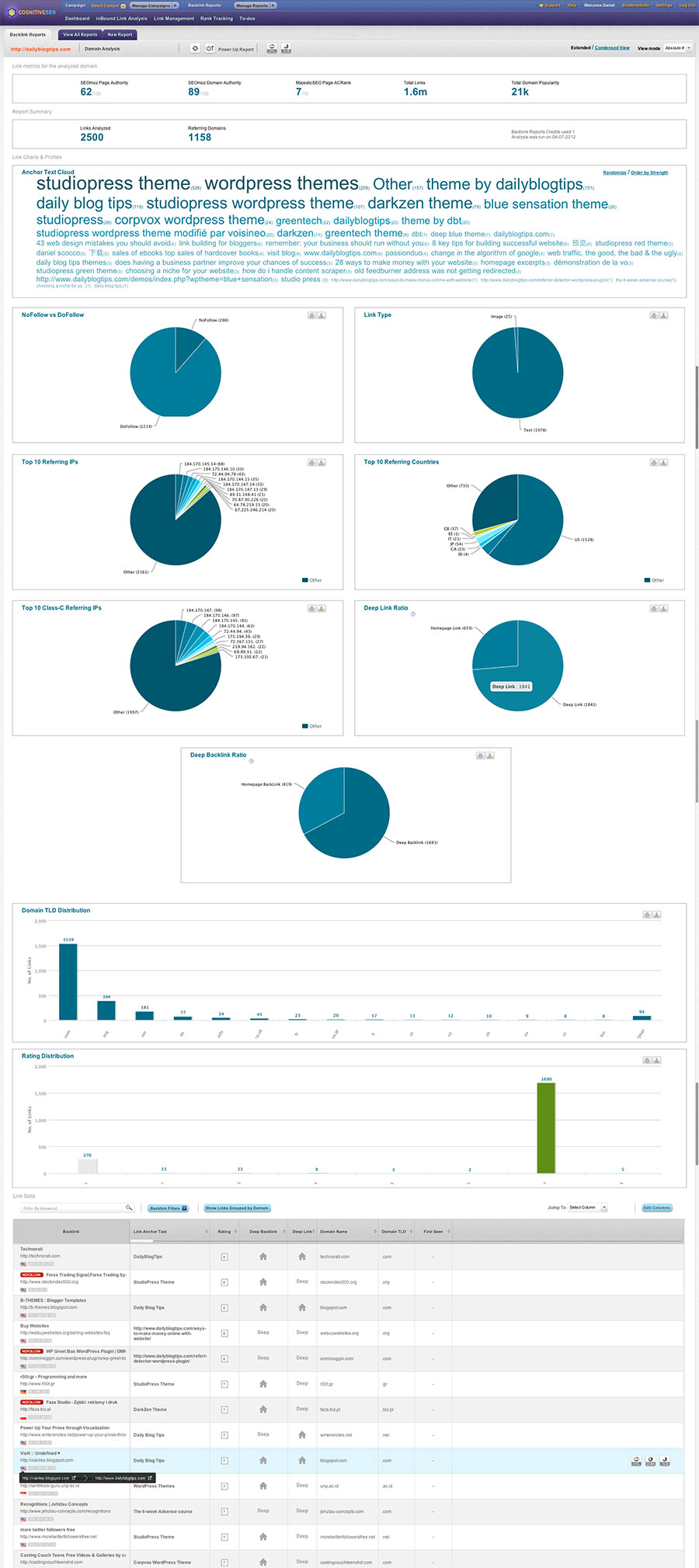
After playing around a bit I tested the “Backlink Report” tool. It gives you a complete view of the backlink portfolio of a specific page or of a domain name. You’ll get details like the total number of links, the authority of the page/domain according to various sources, a cloud with the anchor text terms, the authority of the incoming links and so on. The cool thing is that you also have access to all the individual links, as you can see on the image below:
Outrank Your Competitors Faster with These New SEO Tools
This seo tool will even track when the link was first found, whether it’s nofollow or dofollow, and the IP address of the linking website.
Next I decided to create a campaign, which is how you manage your activities inside the suite. You basically create one campaign for each website you want to improve the rankings, and while you add a new campaign you’ll be able to add the URL of your competitors, whether you want the tool to track new backlinks to your and so on. You’ll notice that it takes a while to create the campaign, but that’s because the tool will go and crawl on-demand all the links that it can find for your site and your competitors.
Once your campaign is ready to go, you have four sections to explore: Inboud Link Analysis, Link Management, Rank Tracking and To dos.
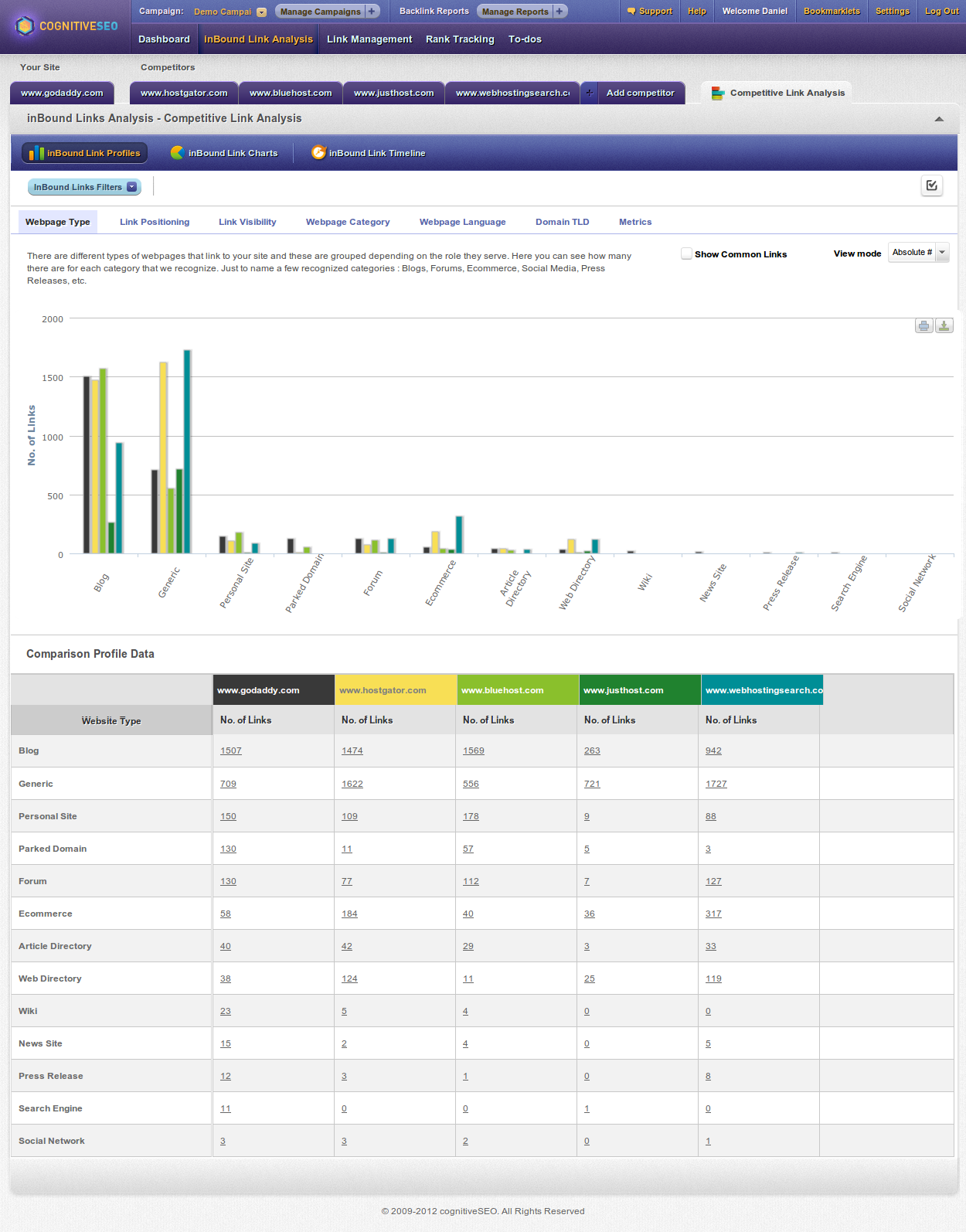
The Inboud Link Analysis section will give you all the backlink data, in a similar fashion to the Backlink Report, but with much more data. However in this section you have the option to compare your backlink portfolio with that of competitors, as you can see on the image below:
Outrank Your Competitors Faster with These New SEO Tools
One cool thing you can do with the Link Analysis tool is to identify websites that have been punished with Google’s Penguin update. Here is a video case study on how you can actually do this.
You also have the ability to filter the links. For instance, you can select only links that were tracked over the past 3 months, that have a ranking authority of at least 3 and that are coming from blogs. So basically you can perform detailed research to understand why your site or that of a competitor is gaining or losing rankings over a certain period of time.
The Link Management section is where you go to manage and grow your backlinks. The tool automatically tracks all new links, as well as the existing ones to make sure they are still online. There’s even a preview tool that let’s you see on a small thumbnail exactly where your link appears on the website that is linking to you. You can also compare your performance with competitors here.
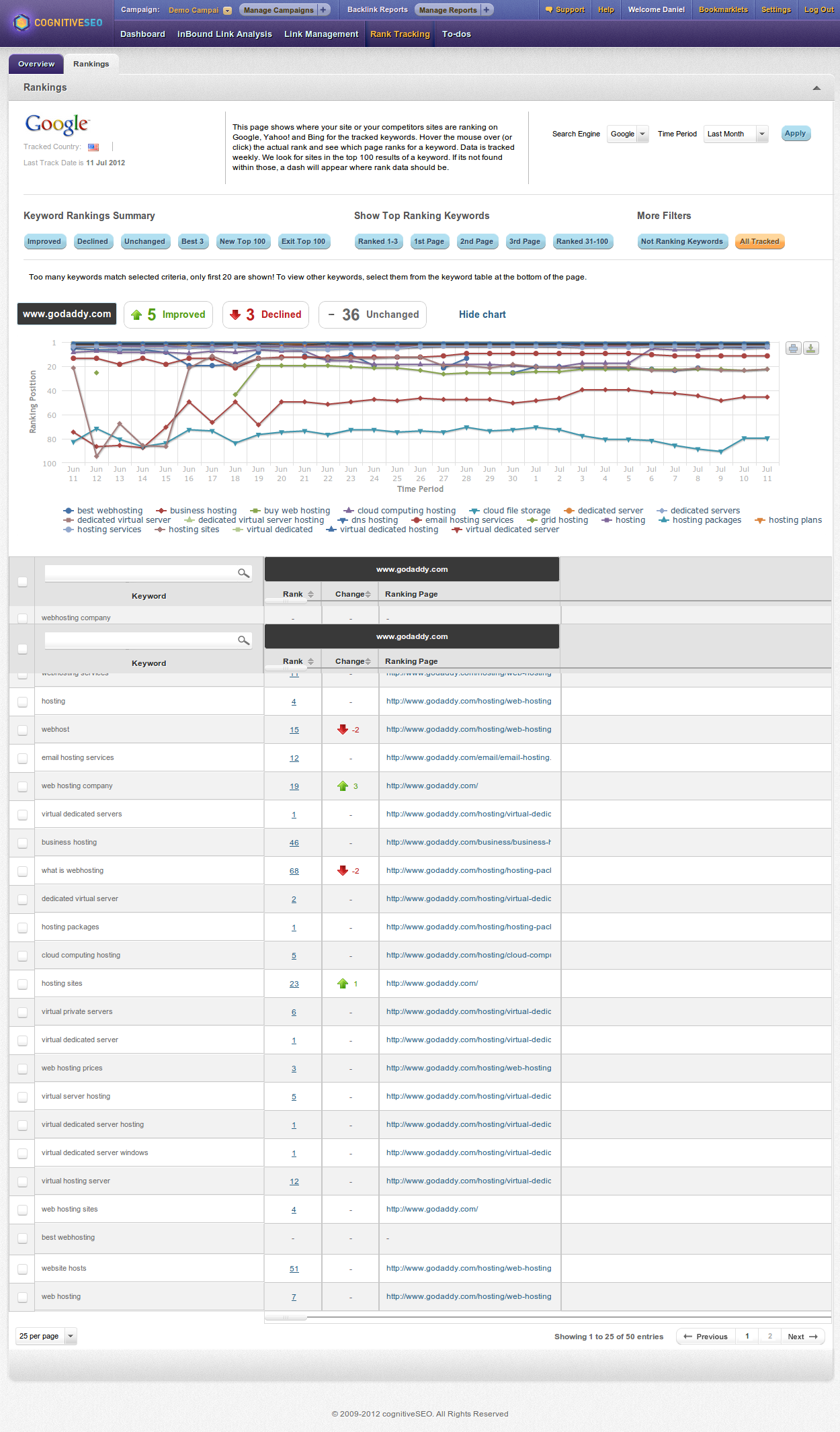
The Rank Tracking section allows you to input keywords you want to track, and it will keep a time line of your rankings, as well as that of competitors. You’ll notice that the graphics are really elaborate and customizable. All the tracking is done on a daily basis, in all the 3 big search engines (Google/Bing & Yahoo).
Outrank Your Competitors Faster with These New SEO Tools
Finally the To-Do section is where you can schedule tasks, co-ordinate efforts with your partner or other members of the team and so on.
As a feedback to the creators of this toolset, I would love to see more modules added in the future. Social stuff and On Page reporting will be great add-ons to the toolset.
If you are planning to take your SEO to the next level I would take a look atcognitiveSEO. The pricing is pretty affordable (starts at $19 per month), and the set of tools you’ll get are among the best in the market, so check it out.

Careful with Your Linkbuilding Strategies


If you haven’t been following the SEO sphere lately here’s what you need to know: Google is starting to push harder against artificial linkbuilding methods, including low quality links, link networks and so on.
Careful with Your Linkbuilding Strategies
Earlier this year Google started sending warnings to websites that were breaking one or more of Google’s policies regarding backlinks. Then we had the Penguin update which supposedly hit many of those websites hard.
The curious thing is that in some cases the penalty coming from those bad links was pretty harsh, and large websites that were penalized were desperate to fix things.
Google’s own advice was to remove those bad links. so the websites started asking for other websites to remove links pointing to them, and threatening to sue if they didn’t! I am not sure if this was clear, but here’s what they were basically saying: “Hey, you know those links you have pointing to my website? While I appreciated them a couple of months ago, I don’t need them anymore, so please remove them or I’ll sue you!”.
Search Engine Land has a very interesting article covering this whole debacle:Insanity: Google Sends New Link Warnings, Then Says You Can Ignore Them. Here’s a quote:
But what if people couldn’t get links taken down? The head of Google’s web spam team, Matt Cutts, just generally suggested such a thing was possible without giving any specific advice.
This led further support to those who argued that “negative SEO” was now suddenly a real possibility, that any publisher could be targeted with “bad links” and made to plunge in Google’s rankings. Google stressed that negative SEO in this way is rare and hard. To this date, negative SEO still hasn’t seemed to be a wide-spread problem for the vast majority of publishers on the web.
Those reassurances — along with a Google help page update saying Google “works hard to prevent” negative SEO — hasn’t calmed some. Negative SEO has remained a rallying cry especially for many hit by Penguin (and many were deservedly hit) looking for a way to fight back against Google.
Bottom line: don’t resort to artificial linkbuilding schemes, networks or paid links, as sooner or later it will get your website penalized. Sure, natural linkbuilding takes a lot more time and effort, but at least you can be sure it will be worth it in the long run.

Selasa, 24 Juli 2012

NoFollow Feedburner Feed Links?

Inserting the rel=’nofollow’ tag within links will inform Google and other search engines that they should not follow that link (i.e. not sharing the link love). Most of the times using this attribute is a bad idea because it will remove the value of external links, like in the Wikipedia case.
NoFollow Feedburner Feed Links
What about the links pointing to your Feedburner feed(http://feeds.feedburner.com/yourfeed)? Feedburner provides an outstanding service and they do deserve recognition, but could a rel=’nofollow’ tag on those links have some benefits?
First of all many blogs have their Feedburner feed page ranking higher on search engines than the blog itself for most keywords. This is not optimal since a potential reader might end up visiting the feed page and not visiting the blog at all.
Secondly, provided you publish full feeds, the Feedburner feed page will also have the same content of your Homepage, possibly resulting on duplicate content penalties.
Inserting a nofollow tag on the feed links could resolve the first problem and improve the second one, specially if your feed links are sitewide and your blog has a high Pagerank.
Update: Marketing Pilgrim has a post with more suggestions for this issue.

Search Engine Ranking Factors

It is always a good idea to be updated on the factors that search engines use to determine search results and rank websites. SEOMoz released a very detailed document titled “Search Engine Ranking Factors V2”, which outlines the views of 34 SEO experts regarding how Google’s algorithm works. Below you will find the Top 5 positive and negative factors on the study:
Search Engine Ranking Factors

Top 5 Positive Factors

  1. Keyword Use in Title Tag
  2. Global Link Popularity of Site
  3. Anchor Text of Inbound Link
  4. Link Popularity within the Site
  5. Age of Site

Top 5 Negative Factors

  1. Server is Often Inaccessible to Bots
  2. Content Very Similar or Duplicate of Existing Content on the Index
  3. External Links to Low Quality/Spam sites
  4. Participation in Link Schemes or Actively Selling Links
  5. Duplicate Title/Meta Tags on Many Pages

Jumat, 20 Juli 2012

How Google Ranks Blogs

Google Blog Search is a new tool that is gaining popularity on the Internet lately. The Blog Search might also be a good source of visitors if your blog rank on the first positions for specific keywords, but what factors does Google take into account to elaborate the search results?
How Google Ranks Blogs
The “Seo by the Sea” blog has an interesting articleanalyzing a new patent from Google that contains some indicators about the positive and negative factors affecting blog ranking, check it out:
Positive Factors:
  • Popularity of the blog (RSS subscriptions)
  • Implied popularity (how many clicks search results get)
  • Inclusion in blogrolls
  • Inclusion in “high quality” blogrolls
  • Tagging of posts (also from users)
  • References to the blog by sources other than blogs
  • Pagerank
Negative Factors:
  • Predictable frequency of posts (short bursts of posts might indicate spam)
  • Content of the blog does not match content of the feed
  • Content includes spam keywords
  • Duplicated content
  • Posts have all the same size
  • Link distribution of the blog
  • Posts primarily link to one page or site

Jumat, 13 Juli 2012

Apply for the SEO Clinic

The Search Engine Journal started a new project called SEO Clinic. They will basically select one blog every week and optimize it. The tips and advice will include link building techniques, site navigation, usability, copywriting, social media optimization and more.
The project is a free service, and considering the expertise of those guys I guess that it could be worth even for established sites. You can candidate your blog for the SEO Clinic through the contact form on the website.

Gather .edu and .gov backlinks

It is widely accepted that .edu and .gov backlinks carry a larger weight for search engine algorithms. Despite the fact that Google has never admitted it (sometimes it even neglected) most SEO and online marketing experts would confirm that .edu and .gov links outperform other extensions in terms of search ranking juice.There are several ways to collect those links, below I will explain two of them, depending on whether your blog has relevant content to educational and governmental websites or not.
Blogs with relevant content
The first step to get some .edu and .gov backlinks pointing to your website is to locate sites related to your topic ending with those extensions. Using the Google operator site:.edu and site:.gov combined with the keywords of your blog should enable you to find an extensive list of such sites.

site:.edu "keyword 1" 

site:.gov "keyword 1"

Once you have a list of sites explore them and select the ones you think would have a higher probability of sharing some external links with your blog. Finally contact the webmaster of those sites and point them to the content on your blog that could be relevant and valuable to those sites. It is always a good idea to link first to the sites before asking the backlink.
Blogs without relevant content
If your blog does not have content that could be relevant or valuable to educational and governmental websites your should look for types of sites that allow users to create a backlink without interacting with the webmaster, and the most common types of those sites are blogs and online forums.
Again you can use the Google operators to generate a list of such sites. Notice that the site:.edu argument limits the search results to sites with a .edu extension while the inurl:blog attribute ensures that results will have the word blog on the URL structure.

site:.edu inurl:blog "keyword 1"

site:.edu inurl:forum "keyword 1"

site:.gov inurl:blog "keyword 1"

site:.gov inurl:forum "keyword 1"    

Finally track down the sites with discussions relevant to the topic of your blog and join the conversation, leaving a backlink to your site either through the comment section or on inside a forum thread. Bear in mind that you should not spam those sites for the sake of getting as many backlinks as possible. Make sure that you are adding useful information and not just polluting the online environment.
Update: Check out the “Enhanced” version of those search queries.


Sabtu, 07 Juli 2012

Create a robots.txt file

The robots.txt file is used to instruct search engine robots about what pages on your website should be crawled and consequently indexed. Most websites have files and folders that are not relevant for search engines (like images or admin files) therefore creating a robots.txt file can actually improve your website indexation.
A robots.txt is a simple text file that can be created with Notepad. If you are using WordPress a sample robots.txt file would be:
User-agent: *
Disallow: /wp-
Disallow: /feed/
Disallow: /trackback/
“User-agent: *” means that all the search bots (from Google, Yahoo, MSN and so on) should use those instructions to crawl your website. Unless your website is complex you will not need to set different instructions for different spiders.
“Disallow: /wp-” will make sure that the search engines will not crawl the WordPress files. This line will exclude all files and foldes starting with “wp-” from the indexation, avoiding duplicated content and admin files.
If you are not using WordPress just substitute the Disallow lines with files or folders on your website that should not be crawled, for instance:
User-agent: *
Disallow: /images/
Disallow: /cgi-bin/
Disallow: /any other folder to be excluded/
After you created the robots.txt file just upload it to your root directory and you are done!

How to setup a 301 Redirect

The “301 Permanent Redirect” is the most efficient and search engine friendly method for redirecting websites. You can use it in several situations, including:
  • to redirect an old website to a new address
  • to setup several domains pointing to one website
  • to enforce only one version of your website (www. or no-www)
  • to harmonize a URL structure change
There are several ways to setup a 301 Redirect, below I will cover the most used ones:
PHP Single Page Redirect
In order to redirect a static page to a new address simply enter the code below inside the index.php file.

<?php
header("HTTP/1.1 301 Moved Permanently");
header("Location: http://www.newdomain.com/page.html");
exit();
?>

PHP Canonical Redirect
The Canonical 301 Redirect will add (or remove) the www. prefixes to all the pages inside your domain. The code below redirects the visitors of the http://domain.com version to http://www.domain.com.

<?php
if (substr($_SERVER['HTTP_HOST'],0,3) != 'www') {
header('HTTP/1.1 301 Moved Permanently');
header('Location: http://www.'.$_SERVER['HTTP_HOST']
.$_SERVER['REQUEST_URI']);
}
?>

Apache .htaccess Singe Page Redirect
In order to use this method you will need to create a file named .htaccess (not supported by Windows-based hosting) and place it on the root directory of your website, then just add the code below to the file.

Redirect 301 /old/oldpage.htm /new/http://www.domain.com/newpage.htm

Apache .htaccess Canonical Redirect
Follow the same steps as before but insert the code below instead (it will redirect all the visitors accessing http://domain.com to http://www.domain.com)

Options +FollowSymlinks
RewriteEngine on
rewritecond %{http_host} ^domain.com [nc]
rewriterule ^(.*)$ http://www.domain.com/$1 [r=301,nc]

ASP Single Page Redirect
This redirect method is used with the Active Server Pages platform.

<%
Response.Status="301 Moved Permanently"
Response.AddHeader='Location','http://www.new-url.com/'
%>

ASP Canonical Redirect

The Canonical Redirect with ASP must be located in a script that is executed in every page on the server before the page content starts.

<%
If InStr(Request.ServerVariables("SERVER_NAME"),"www") = 0 Then
Response.Status="301 Moved Permanently"
Response.AddHeader "Location","http://www."
& Request.ServerVariables("HTTP_HOST")
& Request.ServerVariables("SCRIPT_NAME")
End if
%>

Selasa, 03 Juli 2012

Optimize your Meta Description Tag

The Meta Description Tag (placed between the head and /head tags) is used by some search engines to create the snippets of text that you see right below the results on search queries. It does not carry any weight in the search algorithm of Google, but it does carry a certain weight for Yahoo and other smaller search engines so you should not neglect it altogether.
One problem with the Meta Description Tag of most websites is that it is static. People usually include a general description about the site, which is suitable only to the home page. Should a visitor find an internal page (say a single post) through a search engine the tag will be the same, containing no information about the content of that internal page whatsoever. You can use the SEO tools listed here to check the quality of your meta description tags.
In order to optimize your Meta Description Tag you should make it dynamic, making sure that it will include the first few lines of text of every single page on your site. A very simple way to do this under the WordPress platform is to make the Description tag equal to the post excerpt, like the code below illustrates.

            <meta name="description" content="<?php the_excerpt() ?>" />

Alternatively you can download a plugin called Head META Description. Just upload the plugin, activate it and insert the following line on your header:

                                             <?php head_meta_desc(); ?>


The plugin will generate the Meta Description automatically, either by extracting the first words of your posts or by displaying the post excerpt (you can configure it).